Why CI Pipelines Redo Work Nobody Changed and How a Command Memoizer Stops It
Watch a CI log for a week and count the steps that produced exactly the same output as last time. Code generation from schemas that didn’t change. Image resizing for assets nobody touched. Test fixtures rebuilt from the same seed data. A documentation site rendered from the same pages. Each step is a few seconds or a few minutes. On every push, on every branch, on every laptop, it adds up to hours a week of machines doing work they’ve already done.
The fix sounds simple: if the inputs haven’t changed, reuse the outputs. Programmers call it memoization when a function does it. The hard part is knowing, cheaply and reliably, whether the inputs changed.
Why timestamps aren’t enough
make was the first answer and it’s still everywhere. It compares file modification times: if the output is newer than every input, skip the step. That works on one machine with one working copy. It breaks after a fresh clone, where every file gets a new timestamp. It breaks on a branch switch that touches files without changing them. And it breaks in CI, where each run starts from a fresh checkout and every step looks stale.
Why build systems are too much for most teams
Bazel, Buck and Pants decide by content instead. They hash every input, cache every output and share the cache across machines. They’re very good at it. They also want to own the build: every step declared in their own language, every dependency spelled out, the project shaped around them. For a large monorepo that’s a fair trade. For a team with a Makefile, a few shell scripts and a CI config, it’s a migration project nobody has time for.
The JavaScript world got the same idea in a lighter form with Nx and Turborepo, and they’re tied to JavaScript monorepos. CI systems offer caches too, but you write the cache keys by hand, and a key that misses one input silently serves stale results.
A memoizer for any command
A command memoizer sits in the gap. It wraps one command, the way time or env does, and leaves everything else alone:
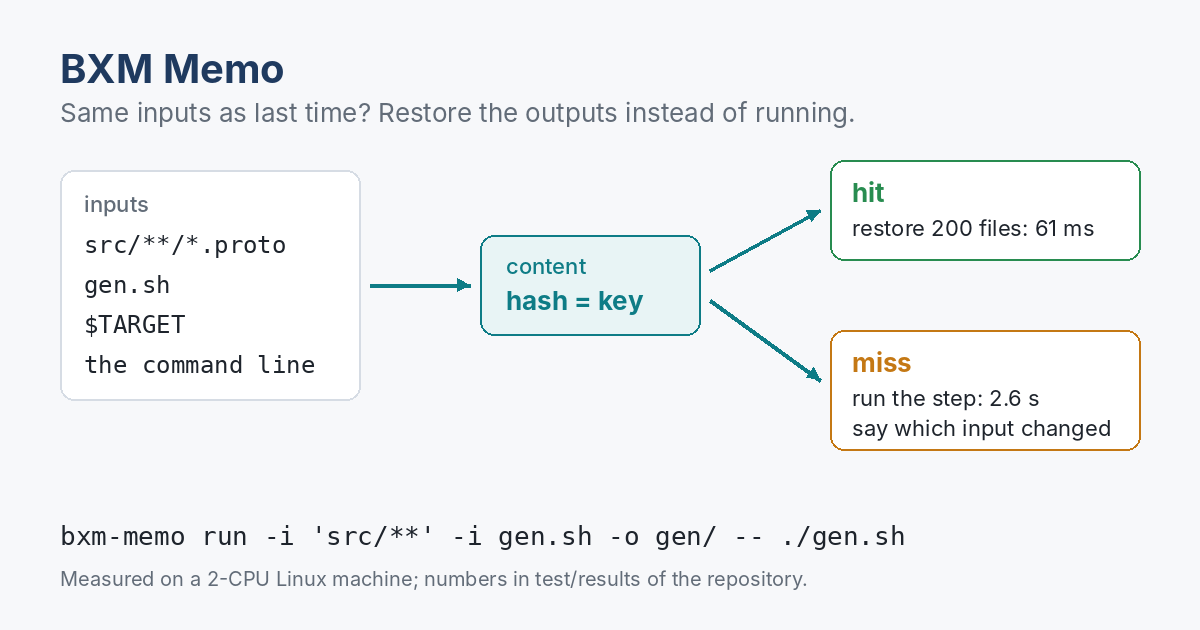
bxm-memo run -i 'proto/**/*.proto' -i gen.sh -o gen/ -- ./gen.sh
You declare what the command reads and what it writes. Memo hashes the contents of every input, together with the command line and any environment variables you name, into one key. If it has seen that key, it restores the outputs and replays what the command printed. If it hasn’t, it runs the command and keeps the result, but only if the command succeeded and wrote what it promised.
On a step that takes 2.6 seconds to write 200 files, the cached run restored all of them in 61 milliseconds. Deciding hit or miss for 1,000 input files took about 40 milliseconds, most of it spent hashing.
The part people underrate: saying why
A cache that misses for no visible reason gets switched off. So Memo compares every miss with the last run of the same job and says what’s different:
bxm-memo: miss gen.sh: input proto/user.proto changed
  env TARGET changed
bxm-memo explain does the same without running anything, which is useful in exactly the moment you’re wondering why CI rebuilt something.
What it trusts you with
Memo doesn’t sandbox the command. If a step reads a file you didn’t declare, a change to that file won’t cause a miss. That’s the price of wrapping any command without taking over the build. In practice, declaring a whole directory as an input is usually the simplest way to be safe, and the hashing is fast enough that it costs little.
Everything else it handles on its own. A failing command is never cached. A restore checks every file before replacing anything, so a damaged cache means a normal run, never half-restored outputs. And many processes can share one cache at once.